

Datahub authorization
When making offers and contracts, we need a new customer authorization in order to access consumption data.
Following a change that came into effect on 20 May 2026, we can no longer create authorizations in the Datahub system on behalf of our customers. The customer must now grant the Datahub authorization via the Suomi.fi service, or if necessary, we can send the customer an authorization request for approval.
On this page you will find instructions on how to proceed with authorizations.
This is how you grant authorization for processing your data in the authorization service.
- Log in to the Datahub authorization service using Suomi.fi authentication.
- The authorization service and Datahub retrieve your customer information and other data to which you are entitled.
- Select “Create authorization” to grant a new authorization. (Highlighted in green in the example image.)
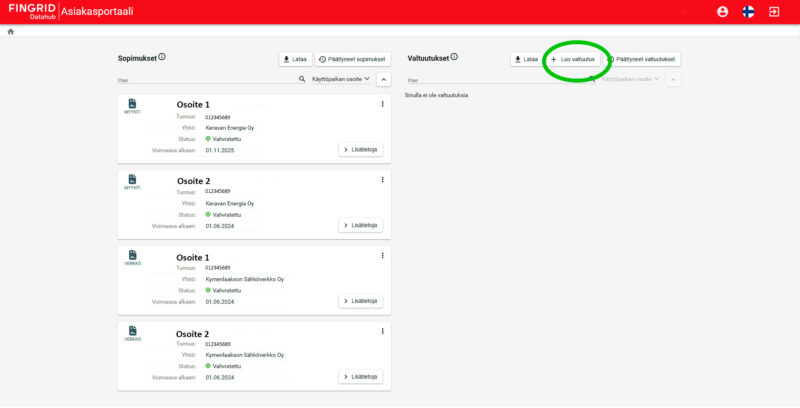
4. Select the type of authorization.
5. Select one or more consumption points for which you want to grant authorization. Please ensure that you grant authorization for all consumption points from which you want to receive an offer from the supplier.
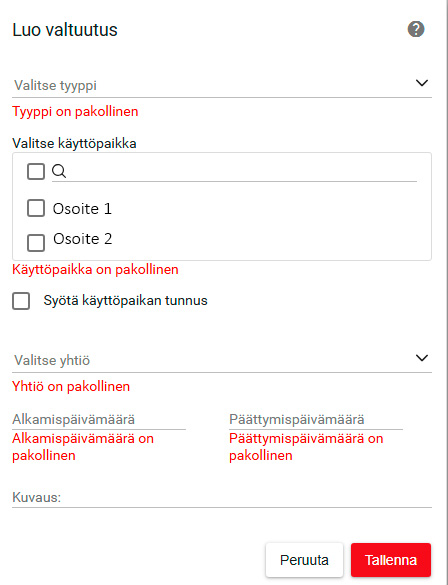
6. Select the company you want to send the authorization to and set the start and end date of the authorization.
7. Create the authorization by saving the form. Once the authorization is created, it will be saved from the authorization service to Datahub, and the information will be forwarded to the supplier.
How to approve an authorization request sent by the seller in the authorization service.
- The seller creates an authorization request in Datahub based on your request for a quote.
- You will receive a message from Datahub by email asking you to approve the authorization.
- The email will direct you to log in to the authorization service, where login is done using Suomi.fi authentication.
- In the authorization service, you can see an authorization request sent by the seller, which you can either accept or reject. Please note that receiving an offer requires you to accept the authorization request.
- Check that the consumption sites shown in the authorization service are correct before approving the authorization.
- When you approve the authorization, the service will store it in Datahub.
- The seller receives information from Datahub that the authorization has been approved and can now make an offer using the correct consumption data.


